
Hildegard Pre-alpha Source Install

Free and open source Windows, macOS and Linux

Your own film studio, on your own GPU.

Direct video models with real camera language: bodies, lenses, apertures, moves and film looks. Every shot renders on computers you own, and nothing costs money per shot.

Free for Windows, macOS and Linux.

Nothing spent

The work

Made with Hildegard

Frames from real takes, with the prompt the director wrote and the settings they chose. Each take is 5 seconds at 24 fps, rendered on one 12 GB laptop GPU.

The Studio

Direct it like a film

Pick a camera, a lens, an aperture and a move. Hildegard turns them into words the model understands, then keeps every take on the board.

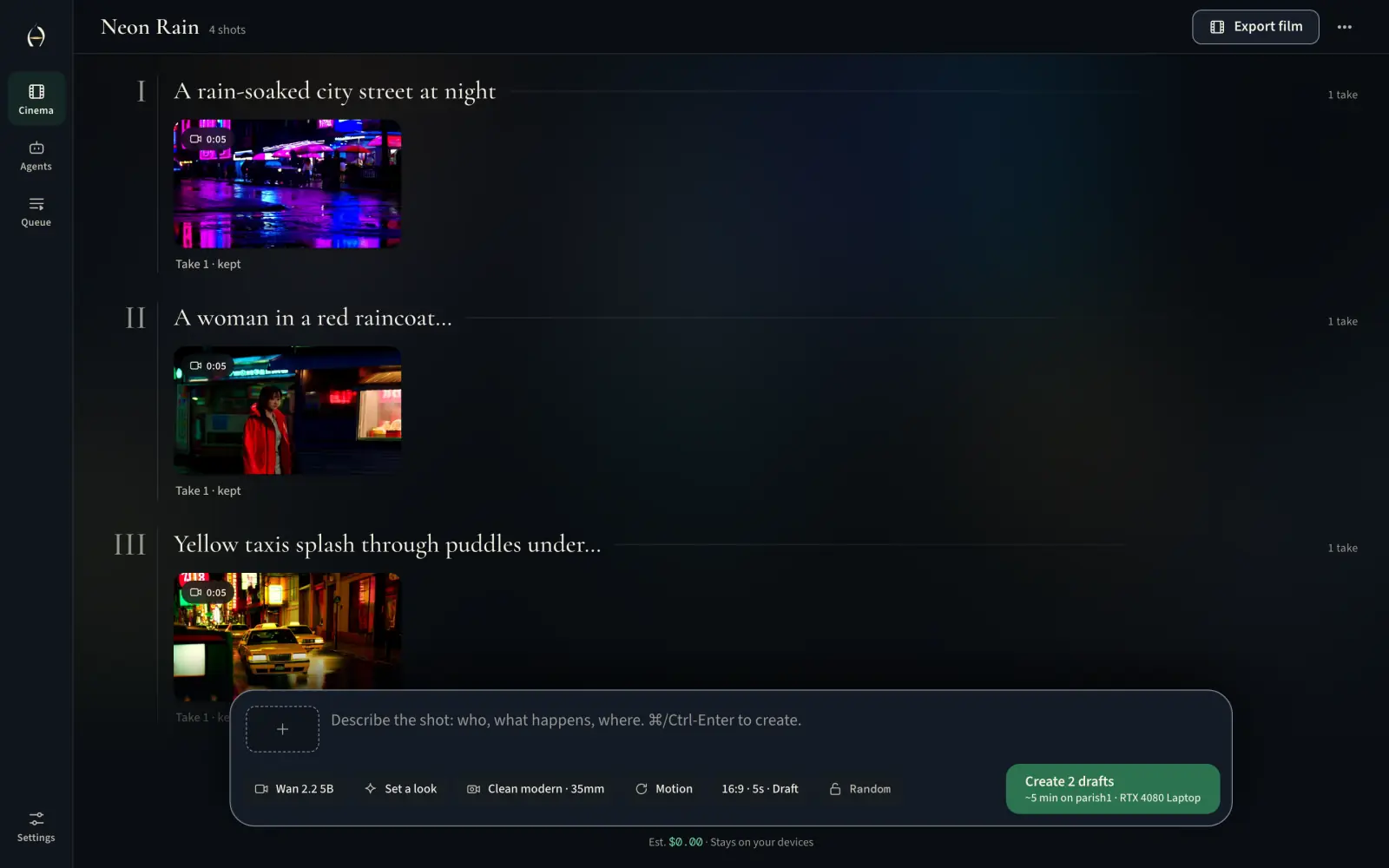
The Hildegard Studio showing the Neon Rain film board, with four kept takes and their posters.
The Neon Rain board, with four kept takes.
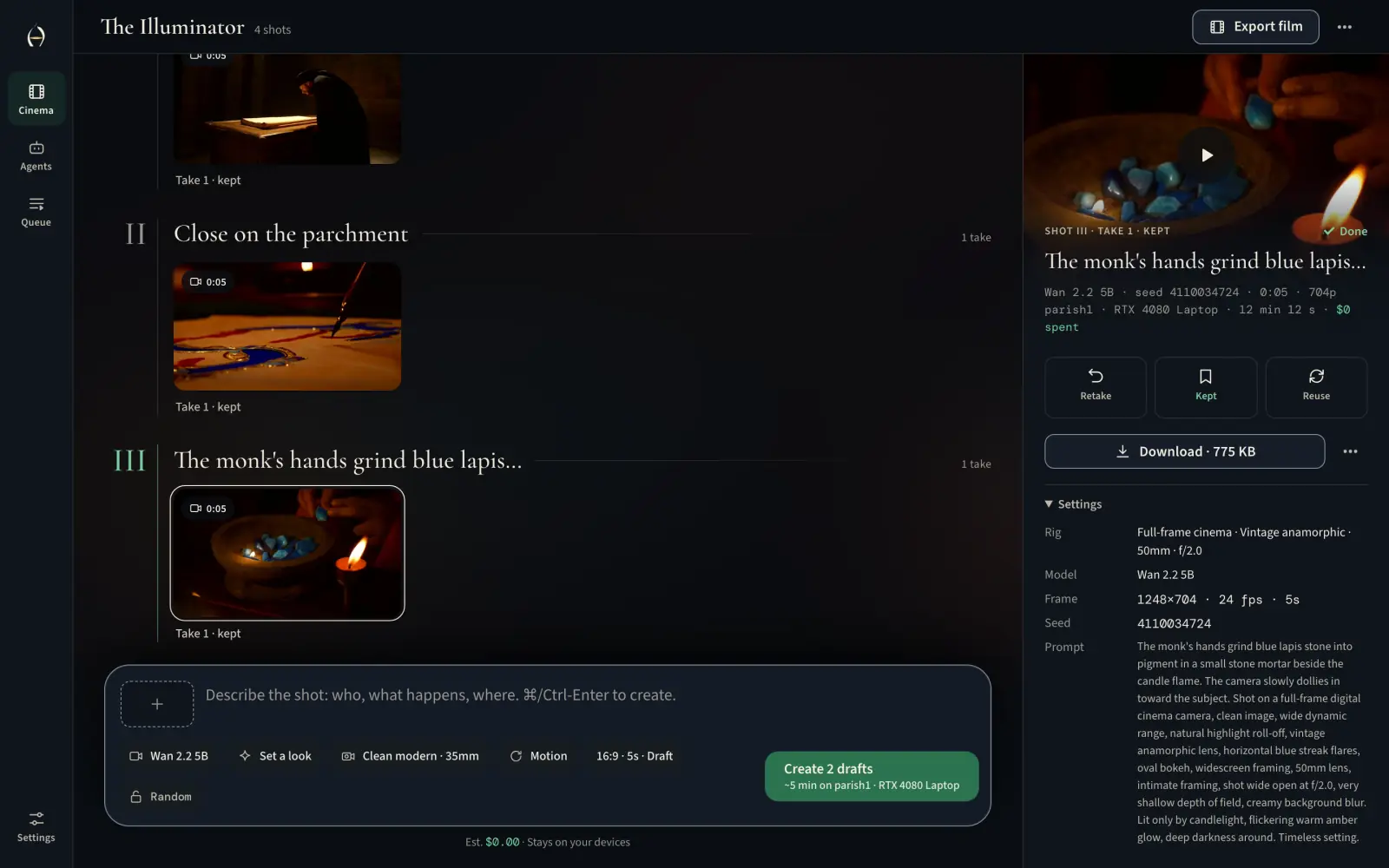
The Illuminator, shot III, open in the Studio’s Inspector with its camera rig settings.
The Illuminator, shot III, in the Inspector.
  • Camera language

    Bodies, lenses, apertures, moves and film looks, the way a cinematographer says them.

  • Shots become a film

    Keep the takes you like, put shots in order and export the film.

  • Open models

    LTX and Wan, run through ComfyUI on your GPU. Each model’s license is shown before it downloads.

Install

Install Hildegard

Pick your computer.

The desktop app

Download it, open it, and follow the steps. No admin rights needed.

Download for Windows

Hildegard_x64-setup.exe 64-bit

Or one line in PowerShell

Also no admin rights. Installs in your home folder.

irm https://dbaney.com/hildegard/install.ps1 | iex
  • The app isn’t signed yet in this pre-alpha, so Windows asks you to confirm. Choose More info, then Run anyway.
  • On Windows, Hildegard renders on NVIDIA graphics cards. AMD support is coming.

Then pick a model

The app walks you through it. In a terminal, it’s two commands.

  1. hildegard setup

    Picks a video model that fits your GPU and links your AI apps.

  2. hildegard open

    Opens the Studio in your browser.

  • Checks every download against a SHA-256 written into the installer.
  • Puts everything in one folder: %LOCALAPPDATA%\Hildegard
  • Sets up ComfyUI and PyTorch for your GPU, then starts Hildegard.

What you need

A graphics card does the rendering

The more memory it has, the better the model it can run. hildegard setup checks yours and picks the best one that fits. Every frame above came from a 12 GB laptop GPU.

  • 24GBor more

    NVIDIA, or AMD on Linux

    LTX-2.5 distilled

    Video with sound, up to 1088p.

  • 12GBto 23 GB

    NVIDIA, or AMD on Linux

    Wan 2.2 5B

    Silent video at 720p. With 9 to 11 GB it still runs, just slower.

  • A Mac

    Apple silicon

    Your other computer’s GPU

    The Studio runs on the Mac. Takes render on a paired computer with an NVIDIA or AMD GPU, since the models don’t render well on Apple’s GPU yet. Pair it with another computer.

  • Anything else

    A laptop, or no GPU

    Another computer’s GPU

    Install it anyway, and let it render on another device.

Disk
18 GB for Wan 2.2, 37 GB for LTX-2.5, plus room for PyTorch.
Rights
No admin rights or sudo. It all stays in your home folder.
Network
Only to download. After that, every shot renders offline.

The Choir

Render on another device

A Mac or laptop without a big GPU can render on one of your other computers. Put both on your Tailscale network and install Hildegard on both.

  1. On the computer with the GPU

    hildegard choir invite

    Prints a one-line join code. Treat it like a password.

  2. On the other computer

    hildegard choir join

    Paste the code when it asks. It won’t show on screen.

  3. See it work

    hildegard choir list

    Shots now render there, and the Studio says so. Models installed there count here, so nothing downloads twice.

hildegard choir use local renders here again. In the Studio, Settings, then Devices, does all of this with buttons.

Your Mac and phone send shots to the GPU, over Tailscale.

Agents

Let your AI apps help

An agent can install Hildegard for you. Once it’s running, any AI app you link can direct shots on your GPU.

Set it up with an agent

Claude Code, Codex, Cursor and other AI apps can do it. Paste this into one.

Install Hildegard on this computer for me. Follow https://github.com/baney75/hildegard/blob/main/INSTALL-FOR-AGENTS.md step by step. Ask me before you accept any model license, and never ask me for a token or passphrase.

It shows you each model’s license word for word and asks first. For hosting and devices too, point it at the full guide for agents.

Then direct shots from them

Hildegard is an MCP server. Link an app, and it can direct shots on your GPU.

hildegard connect --all     # every app on this computer
hildegard connect cursor    # or just one
hildegard connect --print   # the config, for any other app

Works with Claude Code, Claude Desktop, Codex, Cursor, OpenCode, VS Code, Windsurf and LM Studio. Each app’s config is backed up before Hildegard adds itself.

  • direct_shot
  • shot_status
  • get_shot
  • cancel_take
  • make_sequence
  • export_film
  • list_presets
  • install_model
  • hildegard_status

Host mode

Host your own at a link

Your studio at an HTTPS link, for your phone, your laptop and the people you invite. Everyone signs in. It uses Tailscale, so install it and sign in first.

  1. hildegard host owner

    Choose your name and a passphrase for signing in from other devices.

  2. hildegard host

    Prints your link, like https://my-pc.tail1234.ts.net. Open it anywhere on your tailnet.

  3. hildegard host invite

    A one-time link for someone else to join as a director.

Directors
Make films of their own, which only they and owners see.
Owners
Can do everything: models, devices, people and settings.

The link stays inside your tailnet. hildegard host --funnel puts it on the public internet, so use a long passphrase. hildegard host off turns it off.

Hugging Face

Link Hugging Face, safely

Wan 2.2 downloads without an account. LTX asks you to accept its license on Hugging Face first, so Hildegard needs your account to fetch it.

hildegard hf login

It signs you in with Hugging Face, or asks for a read token at a prompt that doesn’t show what you type. In the Studio, Settings, then Hugging Face, does the same.

  • Kept in your keychain. macOS Keychain, Windows Credential Manager, or the Secret Service on Linux. Without one, a file only you can read.
  • Never on a command line. Never written to ~/.cache/huggingface or shown in your shell history.
  • Never shown to AI apps. If an agent asks you to paste your token into a chat, don’t.

Reference

The fine print

Check what you downloadChecksums for the installer

The installer checks every file it fetches against a SHA-256 written into it, and refuses any that don’t match. To check the installer itself first, fetch it with the release’s SHA256SUMS. Once it’s running, hildegard doctor checks every part and prints the command that fixes each problem.

$u = 'https://github.com/baney75/hildegard/releases/latest/download'
iwr "$u/install.ps1" -OutFile install.ps1
iwr "$u/SHA256SUMS" -OutFile SHA256SUMS
(Get-FileHash install.ps1).Hash.ToLower()
Select-String ' install.ps1$' SHA256SUMS
# the two hashes match? then run it
Get-Content install.ps1 -Raw | iex
Remove HildegardOne folder, so it’s quick

Everything lives in one folder in your home. Your models and films are in that folder too: export any film you want to keep first. Remove the desktop app like any other app. hildegard disconnect <app> unlinks an AI app.

hildegard hf logout
hildegard stop
Remove-Item -Recurse -Force "$env:LOCALAPPDATA\Hildegard"

Then take Hildegard\bin out of your PATH: search Windows for “environment variables for your account”.

Open, and yours to keep. Model weights are never bundled: Hildegard fetches each one from its publisher, shows you its license and asks before the first download.

The app
AGPL-3.0
Free to use, change and share. If you run a changed Hildegard for other people, offer them its source.
The presets
Apache-2.0
Every camera, lens, move and look, plus the film-look node. Reuse them in your own tools.
Wan 2.2
Apache-2.0
Free for anyone, for any use.
LTX-2 and LTX-2.5
LTX Community
Their own license: free for people and companies under $10M in yearly revenue.

Every work begins as a vision.