Your browser, your sign-ins
The agent works in the browser you already use, so it's signed in where you are. It never asks for your passwords. When a page wants a sign-in or a captcha, it hands the tab to you.
Free and open source, for Claude Code, Codex and any MCP agent
Tabkyra lets your coding agent use your real browser, the one that's already signed in where you are. It works in a tab group of its own, in the background, and it asks before it opens a site you haven't allowed.
The idea
A coding agent without a browser stops at the first page that wants a sign-in. A browser tool that takes over your window stops you instead. Tabkyra gives agents tabs of their own in the browser you already have open, while you keep working in yours.
0xSero had already built most of that bridge, on top of Mario Zechner's Sitegeist extension. Tabkyra is my take on their work: one-command setup, a doctor that tells you what's wrong, skills that teach an agent to use it well, a source library, a private mode and a new name. Tabkyra is tab plus kyra, from the Greek kybernētēs, helmsman. You steer. It works the tabs.
What it does
The agent works in the browser you already use, so it's signed in where you are. It never asks for your passwords. When a page wants a sign-in or a captcha, it hands the tab to you.
Each agent gets a group like "Tabkyra · claude". Its tabs open in the background, it can't see your other tabs, and its popups don't steal your focus.
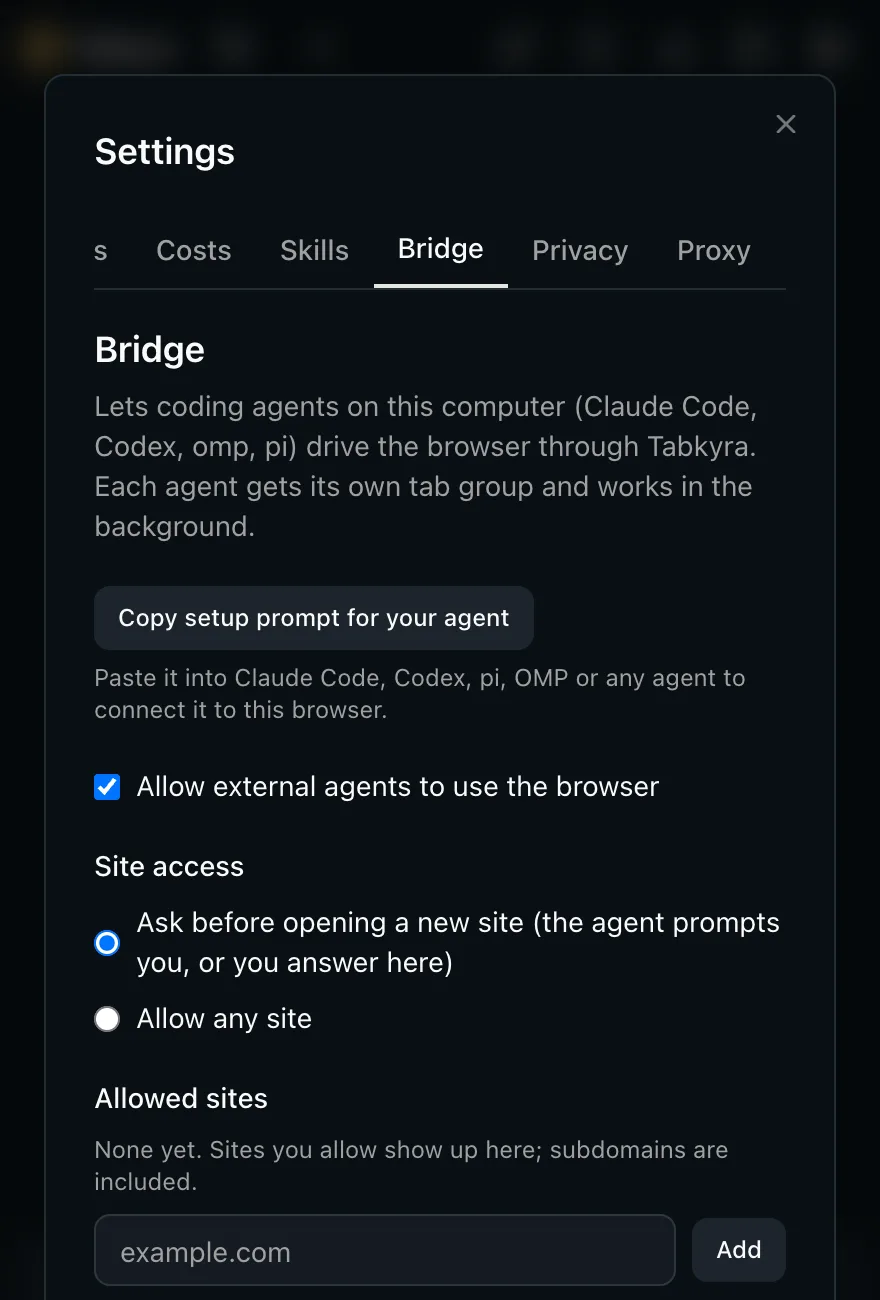
Before an agent opens a site you haven't allowed, it asks. Claude Code and Codex show the question right in the chat. Approve once, approve for good, or allow a site ahead of time with tabkyra allow.
Agents read a page as a list of elements, then click, type, fill forms, drag and scroll with real input events. Screenshots work on hidden tabs, so your window never has to be in front.
Claude Code, Codex, OpenCode, Cursor, OMP and pi, or any MCP client. tabkyra setup connects Claude Code and Codex for you and prints the config for the rest.
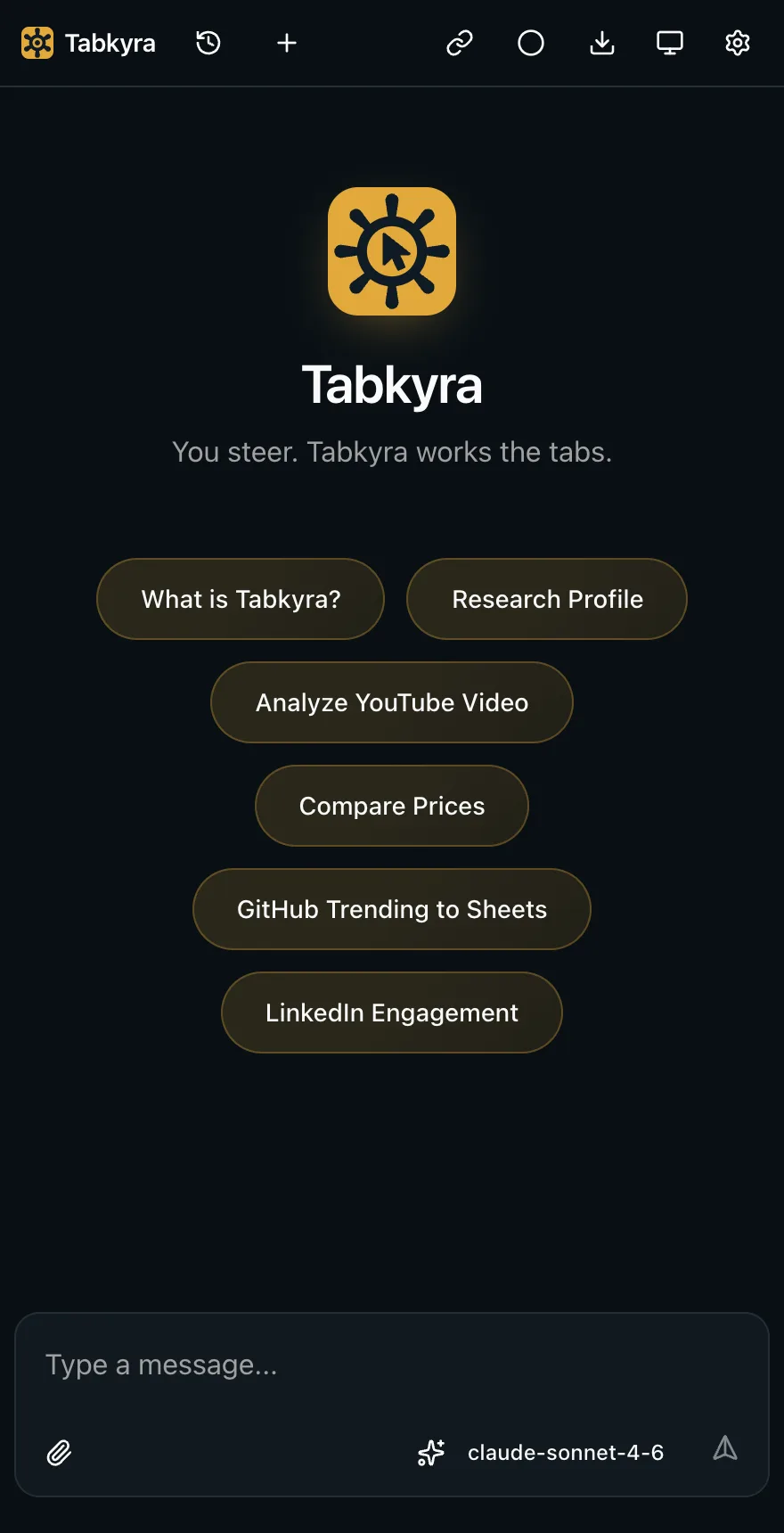
Press Cmd+Shift+S (Ctrl+Shift+S elsewhere) to chat with a page yourself. Bring an API key from the provider you choose, or point it at a model on your own machine.
How it works
One command builds the extension, registers the browser connection with every Chromium browser it finds, and offers to connect Claude Code and Codex and install the skills.
Browsers make you load a developer extension by hand. Turn on Developer mode, click Load unpacked and pick the folder setup shows you. Setup waits until it connects.
Try "Use tabkyra to open news.ycombinator.com and list the top five stories." If anything is off, tabkyra doctor prints the exact fix.
Each agent session keeps its own tab group, even across extension reloads, so an agent that reconnects lands back on its own tabs. Screenshots and input go through Chrome's debugger API, which works on hidden tabs.
Skills
A skill is a short set of instructions an agent loads when a task calls for it. tabkyra skill install adds every one of these to Claude Code, Codex and OpenCode.
tabkyraThe browser loop: check status, read the page, act by reference, read it back. Plus dialogs, safety rules and cleanup.academic-researchFind papers, verify each DOI and its retraction status, and save BibTeX and Obsidian notes.osintPublic-record research on companies, domains and people, with a purpose check first.news-researchPrimary sources and wire services first, more than one side heard, every claim labeled.dorksSearch operators and recipes for Google, Bing, DuckDuckGo, GitHub and Scholar.autoresearchA research loop with sub-questions, a budget and a rule for when to stop.rsiTurns lessons from real work into small, linted, reviewed skill edits.artifactsSelf-contained HTML reports, checked in the browser before they're handed off.proton-passCredentials through Proton Pass, 1Password or Bitwarden, never through the model.kyraskillmakerWrites a new skill to the same standard as these.fix/fix: when a skill fails a smaller model, a stronger one rewrites it for that model and retests until it passes.bug/bug: writes a bug report with private details removed, and files it only when you say so.adversarial-reviewA second model tries to prove a change wrong before you accept it.A skill is text an agent follows with your sign-in, so a bad one is a prompt injection that never expires. Every skill passes tabkyra skill lint before it ships, and CI runs it on every pull request. It refuses hidden text, instructions to ignore earlier rules, piped remote code, secret handling and config tampering.
Safety
An agent can open only the sites you've allowed. Pre-approve one with tabkyra allow github.com, or answer in the side panel under Settings, Bridge.
Every agent is told that page text is untrusted, that it must ask you before it sends, posts, buys or deletes anything under your sign-in, and that it never types passwords or payment details.
An agent sees and controls the tabs in its own group and nothing else. Only one tool brings a tab in front of you, and only when the agent needs you.
The browser starts a small native host that talks over a Unix socket only your user account can open. Only the Tabkyra extension can make the browser start it. Remote access for cloud agents is opt-in: tabkyra serve listens on this computer only, needs a token scoped to the tools you pick, and is reachable elsewhere only through a Tailscale or Cloudflare tunnel you start.
Some browser agents sign in by posing as another company's app. That breaks the providers' terms and gets accounts suspended, so Tabkyra took it out. The side panel uses your own API key or a model on your own machine.
Bundled skills change only through a reviewed pull request, and a red-team test suite proves the lint still catches each attack it's meant to.
Prompt injection is contained, not impossible. The rules above are instructions to the model, and a hostile page can still try to talk an agent into something. The site permission limits where an agent goes, not what it does on a site you've allowed, including running scripts there. Allow only sites you'd let an agent act on, and for high-stakes accounts, run agents in a separate browser profile that isn't signed in.
The library
An agent doing research can cite a paper that doesn't exist, or one that was retracted. tabkyra library refuses a DOI that isn't registered and checks every source for retractions before it saves it.
library_add, library_search and library_cite tools.tabkyra library add 10.1037/0033-2909.132.3.354
tabkyra library cite cepeda2006distributed --style apa
tabkyra library export --format bibtex --out refs.bib
tabkyra library obsidian ~/Vault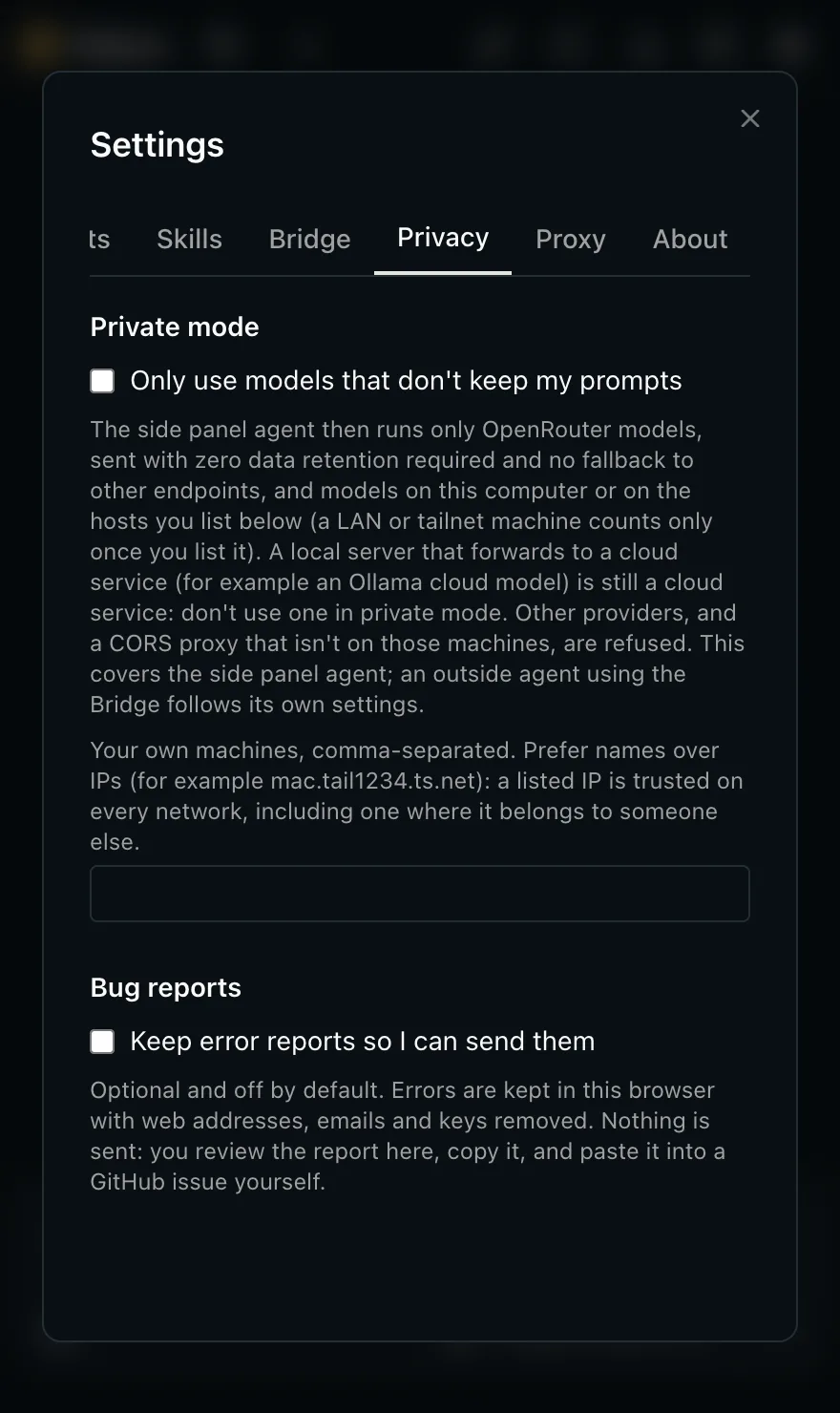
Private mode
Private mode keeps the side panel agent to OpenRouter models with zero data retention required on every request, or to models on your own computer and on machines you list as yours. Every other provider is refused.
Install
You need Node 20 or newer, git, and a Chromium browser at version 141 or newer, like Helium, Chrome or Brave.
Paste this into Claude Code, Codex, pi, OMP or any agent that can run commands. It installs the CLI, connects itself and installs the skills, then stops for the one step only you can do.
Set up Tabkyra (https://github.com/baney75/tabkyra) so you can use my browser. Run each step yourself and show me any output you can't fix.

1. Check that Node 20+ and git are installed: node -v && git --version
2. Get the code. If ~/tabkyra-src/tabkyra exists, cd into it; if git status shows local changes, stop and ask me, otherwise run git pull. If it doesn't exist: mkdir -p ~/tabkyra-src && cd ~/tabkyra-src && git clone https://github.com/baney75/tabkyra && cd tabkyra
3. Build the CLI: (cd cli && npm install && npm run build && npm link)
   If npm link fails with a permissions error, use "node ~/tabkyra-src/tabkyra/cli/dist/index.js" wherever these steps say "tabkyra".
4. Run: tabkyra setup --yes --no-wait
   The first build fetches two dependencies beside the clone and can take a few minutes.
5. Show me the "One step in your browser" box from the setup output, with the folder path, and wait until I tell you I've loaded the extension.
6. Connect this harness if setup didn't: a stdio MCP server named "tabkyra" that runs ~/.config/tabkyra/tabkyra with the argument "mcp". JSON configs need the full path, not ~. pi has no MCP client: run tabkyra pi-extension instead. If this harness reads AGENTS.md instead of skill folders: cd back to the project you started in, then run tabkyra skill print >> AGENTS.md
7. Run tabkyra doctor and fix anything it reports with the command it prints.
8. Restart or reload MCP servers if this harness needs it, then call the tabkyra status tool and tell me whether it says connected.

Don't ask me for API keys or passwords. Tabkyra doesn't need them for this.mkdir tabkyra-src && cd tabkyra-src
git clone https://github.com/baney75/tabkyra && cd tabkyra
(cd cli && npm install && npm run build && npm link)
tabkyra setupClone into a folder of its own, because the first build puts two dependencies beside it. If npm link fails with a permissions error, run node cli/dist/index.js setup instead. Setup builds the extension, registers it with your browsers, offers to connect Claude Code and Codex, and shows you the one step in the browser.
claude mcp add --scope user tabkyra -- ~/.config/tabkyra/tabkyra mcp
codex mcp add tabkyra -- ~/.config/tabkyra/tabkyra mcp
Setup does this for you. OpenCode, Cursor and OMP take a JSON entry, which tabkyra setup prints and the docs list. For pi, run tabkyra pi-extension.
Tabkyra loads in developer mode today. There's no Chrome Web Store listing yet. Here's how you can help change that. Full steps, every agent's config and troubleshooting are in the documentation.
Questions
Yes. It's free and open source under the AGPL-3.0 license, with no account and no paid tier. The side panel agent uses your own API key, which your provider bills; your coding agent uses whatever it already uses.
Not yet. It loads unpacked in developer mode, and tabkyra setup builds it for you. A store listing costs a one-time $5 developer fee.
No. It sees and controls only the tabs in its own group.
Yes. Click its tab group, or have the agent call tabs_show.
That's the site permission. Approve it once or for good, or run tabkyra allow <host> ahead of time. tabkyra allow-all turns the prompts off and tabkyra ask turns them back on.
Chromium 141 or newer. I use it in Helium. The end-to-end test runs in headless Chromium, and setup registers Tabkyra with Helium, Chrome, Chromium, Brave, Edge, Arc, Vivaldi and Opera on macOS and Linux. Most of those haven't been tried by hand yet, and Windows is untested.
Tabkyra collects nothing and runs no hosted service, so nothing is sent to me, and the bridge stays on your computer unless you turn on remote access with a scoped token. Whatever an agent reads through it, like page text and screenshots, goes to that agent's model provider, the same as with any other tool the agent uses.
Run tabkyra doctor. It checks Node, the build, each browser's connection and each agent's config, and prints one command for each problem it finds.
tabkyra update installs signed releases, checks the signature and checksum, and keeps the last version for --rollback. Nothing updates on its own. No release is published yet, so for now update the way you installed: pull the latest code and run setup again.
Remote MCP with scoped tokens over Tailscale or Cloudflare tunnels, and the /fix, /bug and adversarial-review skills, are on the main branch now. In progress: a skill router that loads the one skill a task needs, with a regression test in CI, and nineteen more skills, from mathematics to PCB design. The open pull requests on GitHub show what's in review.
Credits
Built the agent bridge Tabkyra is made of. That covers the native messaging host, the CLI and MCP server, one tab group per agent, background screenshots and input, per-tab side panels and the guard that keeps agent popups from stealing focus.
Wrote Sitegeist, the original extension and its side panel agent, and the pi and mini-lit libraries it runs on.
The name and brand, one-command setup, the doctor, Helium support, the skills and their lint, the source library and private mode. AGPL-3.0, like upstream.
Support
Tabkyra is free and will stay that way. Today the extension loads in developer mode. A Chrome Web Store listing would let it install in one click and update itself, though the CLI would still install from the terminal. The $5 developer fee is the first goal on my support page.
Your agents get a browser that's signed in where you are. You decide which sites they reach.