
Tychicus Browser extension, CLI and MCP server
Browser use and computer use for your coding agents.
A free, open-source Chromium extension, CLI and MCP server that lets Claude Code, Codex, pi and other MCP agents use your real browser, in background tabs of their own, while you keep working.
- Free
- Open source
- Chromium 141+
- macOS
- Linux
- Windows
Why it exists
Why I built Tychicus
A coding agent without a browser stops at the first page that wants a sign-in. A browser tool that takes over your window stops you instead. I wanted my agents to use the browser I already have open, in tabs of their own, while I keep working in mine, and I wanted the same agents to reach the apps on my Mac too.
0xSero built the bridge this grew from, on top of Mario Zechner's Sitegeist extension. Tychicus is my take on their work: a one-command install, a doctor that tells you what's wrong, skills that teach an agent to use it well, a source library, and computer use on the Mac through Polycarp. It started as Tabkyra, lived inside Polycarp for a while, and now has a repository and a name of its own. Tychicus was Paul's courier in the New Testament, the one who carried the letters and did the errands (Ephesians 6:21-22). You send the work and he carries it out.
How it works
Your agent talks to tychicus mcp over MCP. That process reaches a small native host the browser starts, over a Unix socket only your user account can open, and the host talks to the extension through native messaging. The extension drives tabs in the agent's own group through Chrome's debugger API, which works on hidden tabs, so your window never has to be in front. The host answers only the Tychicus extension and exits for any other caller. Remote access is opt-in and needs a token scoped to the tools you pick.
Safety, and its limits
Your browser is signed in as you, so the defaults are careful. An agent asks before it opens a new site. Every agent is told that page text is untrusted, that it must ask you before sending, posting, buying or deleting anything, and that it never types passwords or payment details. For a sign-in or a captcha it brings the tab to you. The side panel chats through Local Studio on your own models by default, so the extension never sees a key or a sign-in token.
Those rules are instructions to the model, not a lock. A hostile page can still try prompt injection, and the site permission limits where an agent goes, not what it does on a site you've allowed. Allow only sites you'd let an agent act on, and keep high-stakes accounts in a browser profile your agents don't use.
Skills and the lint
Skills teach an agent a job, like academic research with verified citations, OSINT with a purpose check, or news with more than one side heard. A skill is text an agent follows with your sign-in, so a bad one is a prompt injection that never expires. Every skill passes tychicus skill lint, which refuses hidden text, instruction overrides, piped remote code, secret handling and config tampering, and CI runs it on every pull request.
 Donovan Baney built Tychicus. About me
What it does
Your agents work the tabs while you work yours
- Claude Code, Codex, OpenCode, Cursor, OMP, pi and any MCP client drive the browser you already use, signed in where you are.
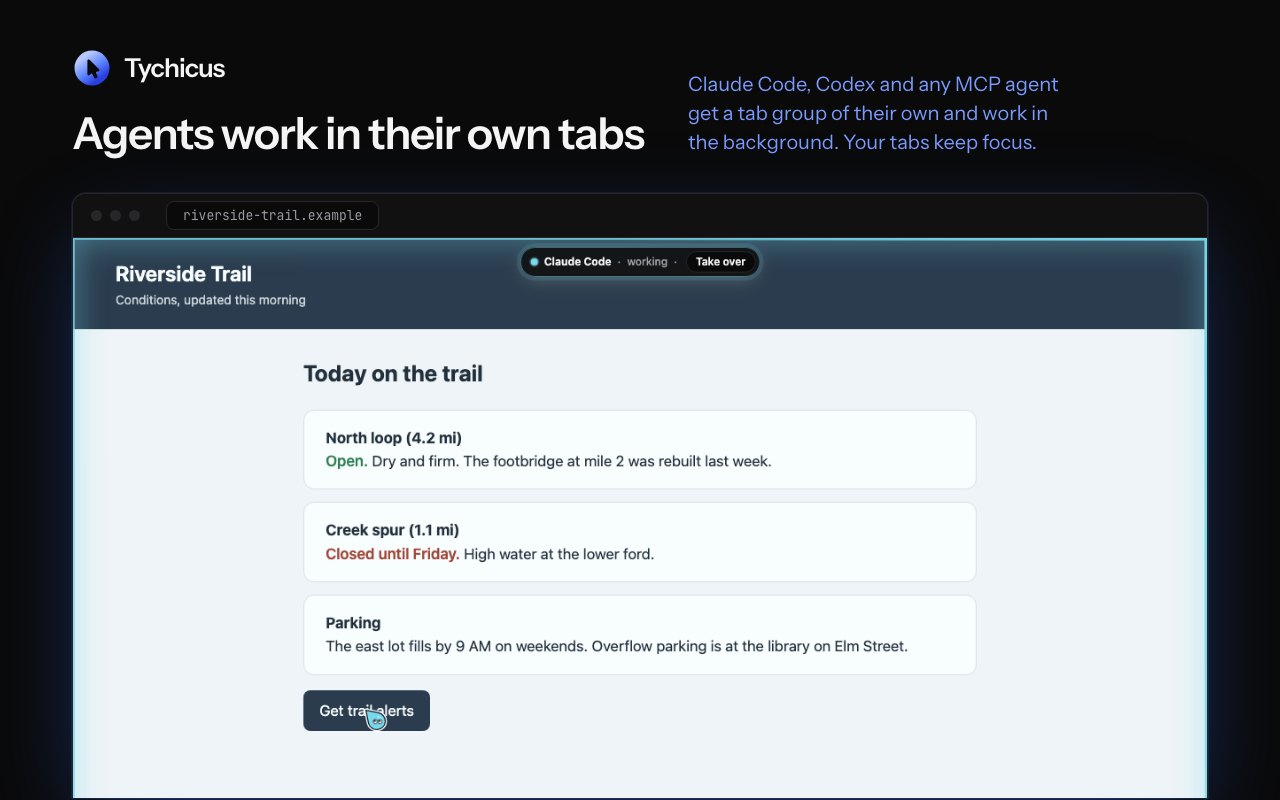
- Each agent gets its own tab group, titled with the agent and the project. Its tabs open in the background, it can't see your other tabs, and its popups don't steal focus.
- An agent asks before it opens a site you haven't allowed. Approve it once or for good, or allow a site ahead of time with
tychicus allow. - One command installs it. The installer checks the release's SHA-256 and its build attestation, needs no sudo and registers the helper with every Chromium browser it finds.
- The side panel chats through Local Studio by default, on your local models, and the extension never holds a key. API keys are still there if you want them.
- On a Mac with Polycarp's app, the same MCP server adds computer use for native apps on the agent workspace, in the background, without taking focus.
- Agents can save verified sources to a library, ask you multiple-choice questions in the side panel, and record evidence like a HAR file or a video of their own tab.
- Nothing listens on the network by default.
tychicus remote setupmakes it reachable from claude.ai, ChatGPT and grok.com through a tunnel you start.
What it isn't
The extension loads unpacked in developer mode for now, as the Chrome Web Store listing is pending. Native app control works only on a Mac with Polycarp's app and is not built on Linux. Local Studio chats are not on Windows yet. Prompt injection is contained, not impossible, and the site permission limits where an agent goes, not what it does on a site you have allowed.
Get it
Get Tychicus
Run the command for your computer, then load the extension: open chrome://extensions, turn on Developer mode, choose Load unpacked and pick the folder the installer printed.
# macOS and Linux
curl -fsSL https://github.com/baney75/tychicus/releases/latest/download/install.sh | sh

# Windows (PowerShell)
irm https://github.com/baney75/tychicus/releases/latest/download/install.ps1 | iex
Found a bug or want something added? Report a bug or ask for a feature on GitHub. No GitHub account? Email me.
What is Tychicus?
A free, open-source Chromium extension, CLI and MCP server that lets Claude Code, Codex, pi and other MCP agents use your real browser, in background tabs of their own, while you keep working.
Is Tychicus free?
Yes. Tychicus costs nothing, and its source code is on GitHub under the AGPL-3.0 license.
How do I install Tychicus?
On macOS or Linux, run the curl command in a terminal. On Windows, run the PowerShell command. It downloads the latest release, checks it, and registers the helper with your browsers. Then open chrome://extensions, turn on Developer mode, choose Load unpacked and pick the folder it printed. Connect Claude Code with claude mcp add --scope user tychicus -- ~/.local/share/tychicus/release/tychicus mcp.
Which agents work with Tychicus?
Claude Code, Codex, OpenCode, Cursor, OMP and any other MCP client. pi has no MCP client, so tychicus pi-extension writes a native pi extension for it. claude.ai, ChatGPT and grok.com can reach it as a connector through tychicus remote setup.
Does Tychicus collect my data?
No. Tychicus runs no hosted service and sends nothing to me. The bridge stays on your computer unless you turn on remote access. What an agent reads through it, like page text and screenshots, goes to that agent's model provider, as with any tool the agent uses.
What happened to Tabkyra?
Tabkyra became the browser part of Polycarp and then moved to its own repository as Tychicus, with its full history. Old Tabkyra links now come here.
Does Tychicus have limits?
The extension loads unpacked in developer mode for now, as the Chrome Web Store listing is pending. Native app control works only on a Mac with Polycarp's app and is not built on Linux. Local Studio chats are not on Windows yet. Prompt injection is contained, not impossible, and the site permission limits where an agent goes, not what it does on a site you have allowed.
From the same maker
More free tools by Donovan
 SilasSpeak. Silas writes.Private on-device dictation for macOS, Windows and Linux. Hold a key, speak, and it types into any app using a local speech model. Audio never leaves the machine.Visit Silas MyelinateUnderstand it, then use it.An AI tutoring skill that teaches from your own course materials. It asks you to recall before it explains, coaches homework without doing the graded work for you, and runs as instructions for Claude Code, claude.ai or Codex. No API key or server required.Visit Myelinate