Desktop app · Rust / TypeScript
Silas
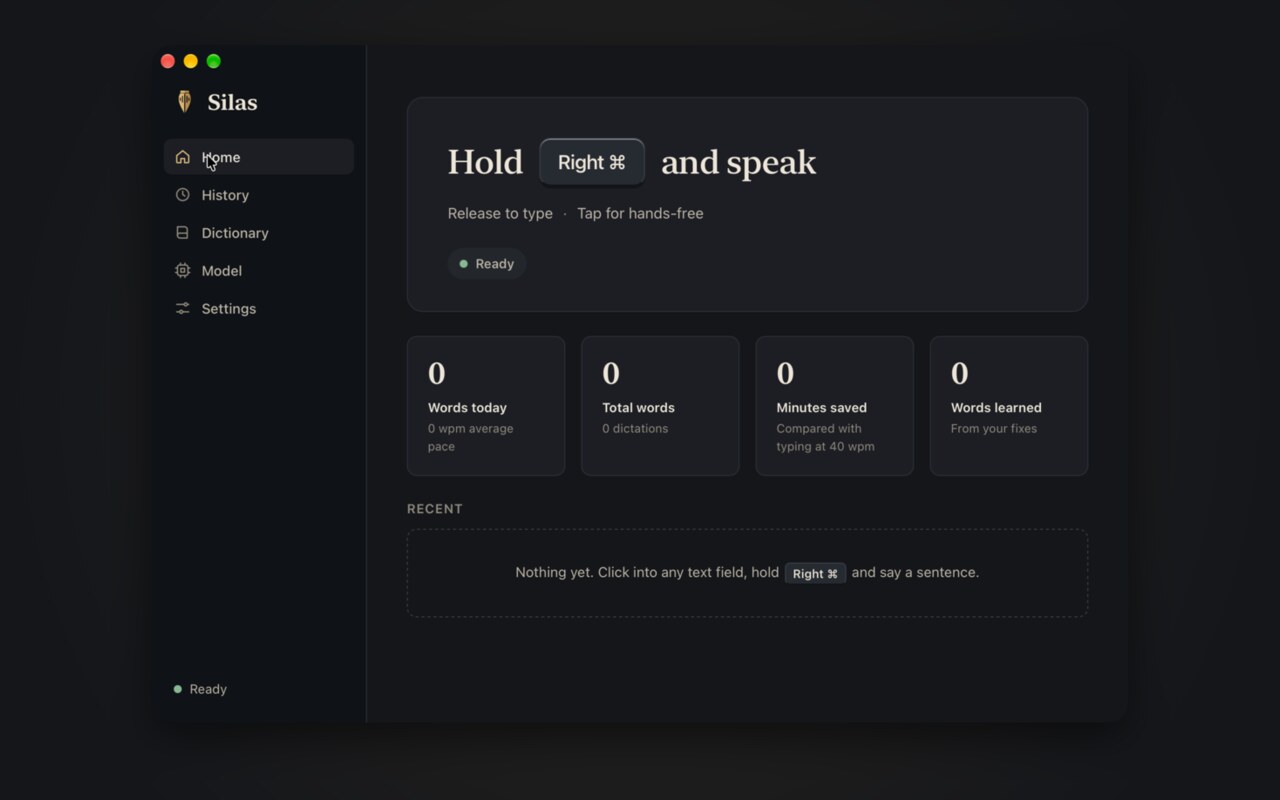
Speak. Silas writes.
Private on-device dictation for macOS, Windows and Linux. Hold a key, speak, and it types into any app using a local speech model. Audio never leaves the machine.
- Free
- Open source
Why I built it
I dictate most of what I write, and the tool I used kept getting in the way. It pasted text, so apps asked for paste permission. It unloaded its model after a break, so the first sentence lagged. Its word lists turned "better" into "Bezier" and "make sure" into "make Azure". Silas is my answer to all three.
The faithful scribe
The name comes from Silas, also called Silvanus, who traveled with Paul and wrote down Peter's first letter: "By Silvanus, a faithful brother... I have written briefly" (1 Peter 5:12). The app has the same job. You speak, and it writes your words down faithfully, spelled your way.
How it learns
When Silas types a word wrong and you fix it right there, Silas notices the edit. A name it didn't know, like the name of your server, is learned at once. An ordinary word is learned the second time you make the same fix. You can also teach a fix from History, or add names and corrections in the dictionary.
Choosing the model
I tested the two strongest local models on eight of my own dictations. Parakeet v3 transcribed 175 seconds of speech in 15 seconds, and Cohere Transcribe took 80 seconds and dropped part of a long recording. Silas ships Parakeet v3 and cleans up filler words and stutters itself.
What it does
- Hold Right Command on a Mac (Right Ctrl on Windows and Linux), speak, and release. A quick tap starts hands-free mode.
- Types real keystrokes instead of pasting, so apps show no paste prompt and the clipboard stays yours.
- Runs the Parakeet v3 speech model on your own computer. A short sentence is ready in under a second, and audio never leaves the machine.
- Learns as you fix it. Backspace over a wrong word right after Silas types and retype it, or teach a fix in History.
- Never bends everyday words into jargon. Your dictionary only applies to names and rare words.
- Stable updates on macOS and nightly builds for all three systems, signed and installed in the background.
Limits. The stable channel is macOS only. Windows and Linux builds are nightly and less tested. On Wayland, typing needs the wtype tool.
Get Silas
# macOS and Linux
curl -fsSL https://raw.githubusercontent.com/baney75/silas/main/install.sh | sh

# Windows (PowerShell)
irm https://raw.githubusercontent.com/baney75/silas/main/install.ps1 | iexFull setup, configuration and troubleshooting are in the Silas documentation.
Found a bug or want something added? Report a bug or request a feature on GitHub. No GitHub account? Email me.
Silas questions
What is Silas?
Private on-device dictation for macOS, Windows and Linux. Hold a key, speak, and it types into any app using a local speech model. Audio never leaves the machine.
Is Silas free?
Yes. Silas costs nothing, and its source code is on GitHub under the MIT license.
What is Silas?
Silas is private on-device dictation. Hold a key, speak, and let go, and it types into whatever app has your cursor using a local speech model. Audio never leaves the machine. It can learn your words as you fix them.
Is Silas free?
Yes. Silas is free and open source under the MIT license, with no account and no subscription.
Does Silas send my voice anywhere?
No. Speech is transcribed on your computer and audio never leaves it. Silas listens only while you hold the key or have hands-free mode on. Its only network requests are the one-time model download and update checks.
Why does Silas type instead of paste?
Pasting makes some apps ask for permission and overwrites your clipboard. Silas sends real keystrokes, fast enough that a long paragraph lands in about a second.
How do I update Silas?
Silas checks at launch and every four hours and installs signed updates once it has been idle for two minutes. On a Mac, choose Stable or Nightly in Settings; Windows and Linux follow Nightly.
Does Silas have limits?
The stable channel is macOS only. Windows and Linux builds are nightly and less tested. On Wayland, typing needs the wtype tool.
Documentation