Mac app · Swift
BaneySpaces
Nine workspaces. One row of keys.
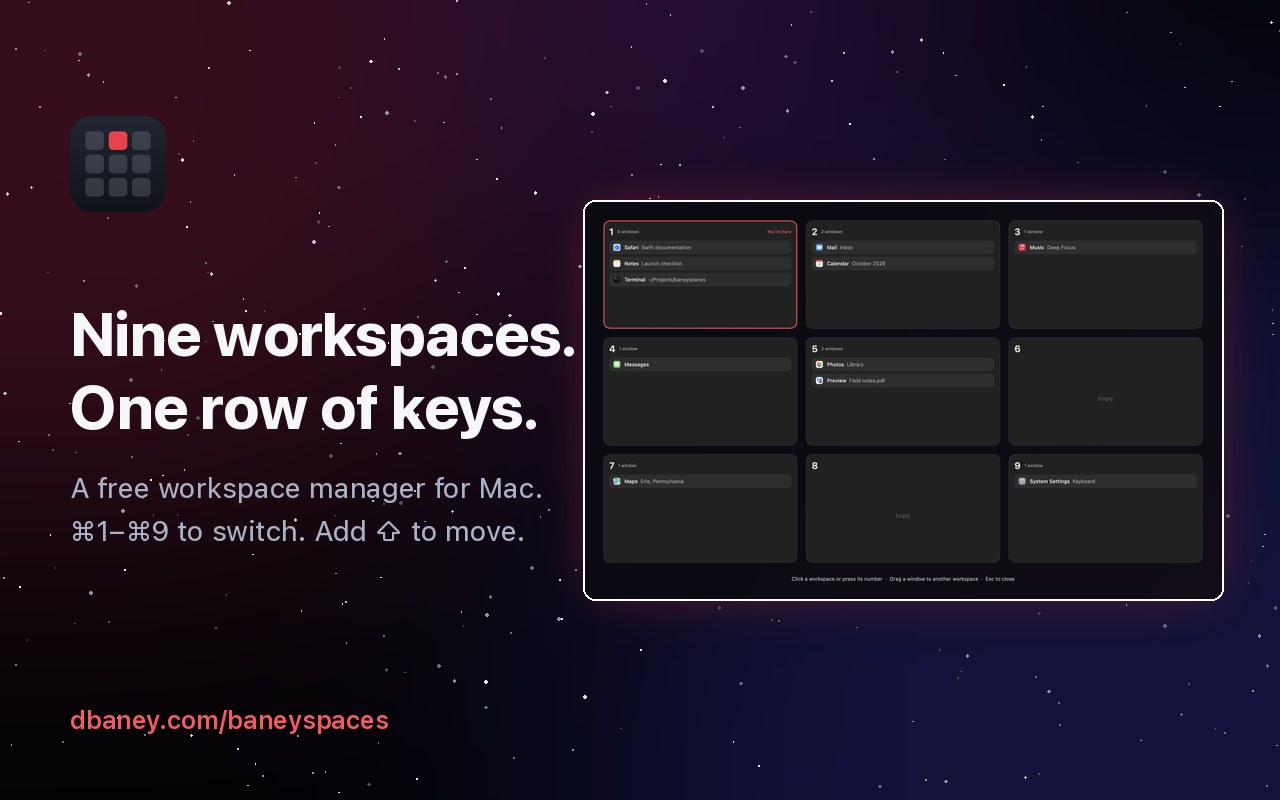
A free Mac workspace manager. Press ⌘1–⌘9 to switch spaces instantly, add Shift to move a window, and open a Deck of terminals and coding agents. Agents get a workspace of their own so automation stays out of your way.
- Free
- Open source
- macOS
Why I built it
I wanted AeroSpace's ⌘1–⌘9 without a tiling layout fighting me, and without full-screen apps breaking it. macOS Spaces get halfway there, then make you swipe, wait for the slide, and drag windows through Mission Control. So I built the part I actually wanted: nine workspaces, a key for each, and windows that stay exactly where I put them.
How it works
BaneySpaces keeps one macOS desktop and divides your windows among nine workspaces. When you switch, every app with nothing on the new workspace is hidden, the same way ⌘H hides it, and the apps that belong there come back. Windows are never moved, minimized or closed, so nothing loses its place. An app with windows on two workspaces is the one exception: its other window steps just off screen and returns to the exact spot it left.
Full-screen apps normally get a macOS desktop of their own, out of reach of any shortcut. BaneySpaces brings them back out and fills the screen with them instead.
The Deck
With several coding agents, a browser and a phone going at once, finding the one that just finished becomes most of the work. The Deck is a sidebar for the workspace you're on. Every Ghostty split, Helium tab and Claude, ChatGPT, T3 Code or Grok Bot window is a row, and Claude Code and Grok hooks report whether each agent is working, waiting or done. ⌃⌘K jumps to any of them. It reads terminals and browsers through their own scripting, so it works with the apps you already use instead of replacing them.
Agents beside you, not in your way
Agents that test GUI work need real apps, and automation that takes over the screen stops you from working. baneyspaces agent on 9 gives them workspace 9. Its apps are parked out of view instead of hidden, because macOS drops background clicks to hidden apps, so Cua can click and type there from behind. Nothing that happens there switches you to it, and a window an agent opens from behind lands there, not on yours. A probe script checks it live: it runs a command, opens TextEdit and types into it on workspace 9, and fails if your workspace, front app or pointer changed for any reason but your own input.
Built to be safe
Quitting BaneySpaces brings every window back. It records what it hid, so even after a crash the next launch restores everything. It has no account and no analytics; its only network request is an optional daily check of GitHub's public release list, and updates install only when you press Update Now.
Switch workspaces without the slide
- ⌘1–⌘9 switches workspaces instantly, with no sliding animation.
- ⌘ Shift 1–9 sends the front window to another workspace and follows it.
- The Mission Control key or Control–Up Arrow opens a 3×3 overview. Click to go, drag a window to move it.
- Windows never tile or resize. Other workspaces' apps are hidden the way ⌘H hides them.
- A guided setup window for the one permission, your choice of shortcut keys and login.
- The Deck, a sidebar of every Ghostty split, Helium tab and Claude, ChatGPT, T3 Code or Grok Bot window, with each coding agent's state.
- An agent workspace where agents and Cua automation drive real apps from behind while you keep working.
Limits. Mac only. The three-finger swipe still opens Mission Control, because macOS handles that gesture itself.
Get BaneySpaces
curl -fsSL https://raw.githubusercontent.com/baney75/baneyspaces/main/install.sh | bashFull setup, configuration and troubleshooting are in the BaneySpaces documentation.
Found a bug or want something added? Report a bug or request a feature on GitHub. No GitHub account? Email me.
BaneySpaces questions
What is BaneySpaces?
A free Mac workspace manager. Press ⌘1–⌘9 to switch spaces instantly, add Shift to move a window, and open a Deck of terminals and coding agents. Agents get a workspace of their own so automation stays out of your way.
Is BaneySpaces free?
Yes. BaneySpaces costs nothing, and its source code is on GitHub under the MIT license.
How do I install BaneySpaces?
Run the one-line installer in Terminal. It builds BaneySpaces from source with Apple's free command line tools and copies it to ~/Applications. A setup window then walks you through the one permission, your shortcut keys and login.
What does BaneySpaces run on?
macOS 13 Ventura or later, on Apple silicon or Intel.
Does BaneySpaces collect my data?
No. It has no account and no analytics. Its only network request is an optional daily update check against GitHub's public release list. It needs Accessibility so it can show and hide other apps' windows, and the Deck asks once per app to read terminal and browser tabs.
Does BaneySpaces have limits?
Mac only. The three-finger swipe still opens Mission Control, because macOS handles that gesture itself.
Documentation