Desktop app · Swift / Rust / TypeScript
Shotate
Point at what matters.
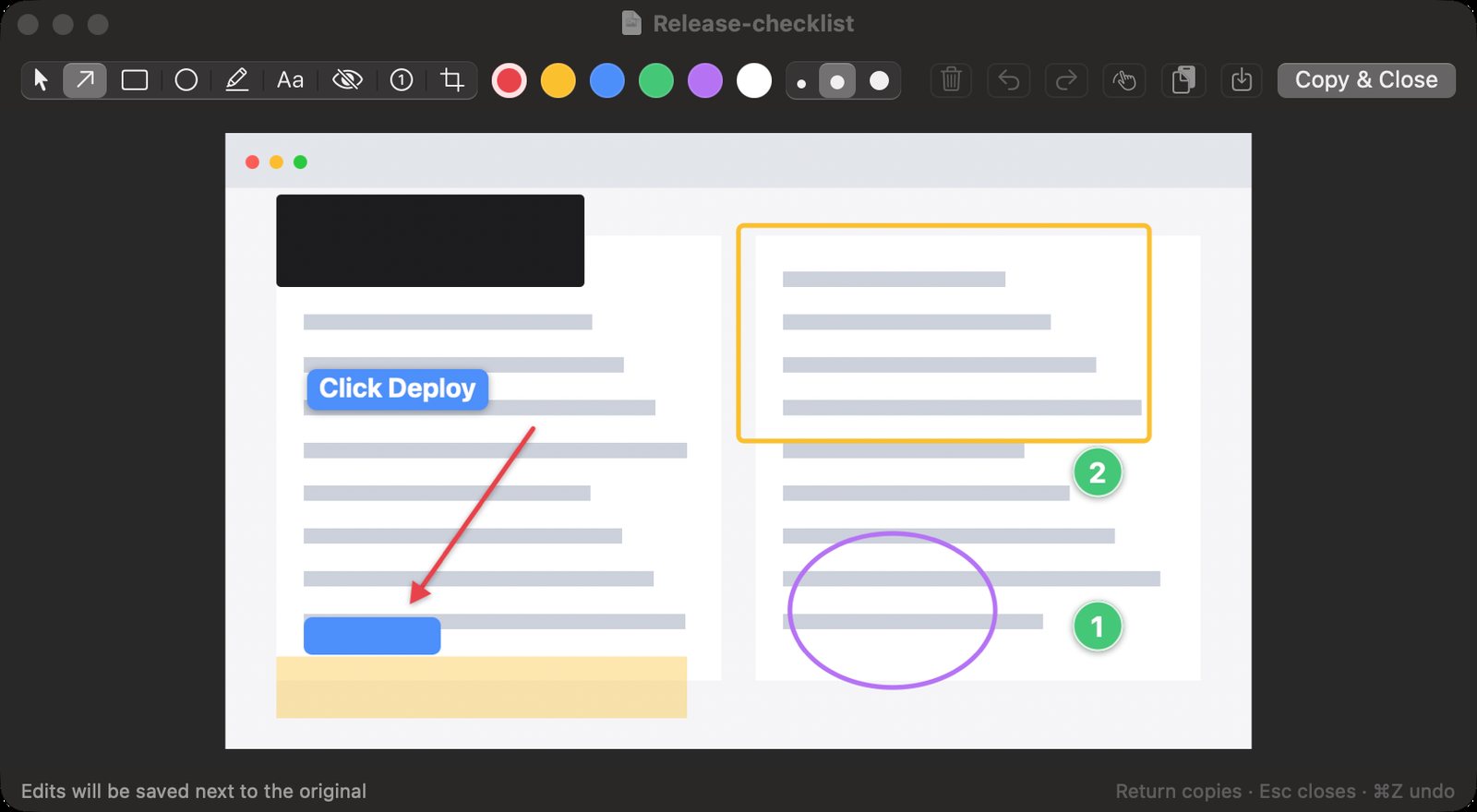
Free, open-source screenshot and annotation for macOS, Windows and Linux. Capture an area, mark it up with arrows, text, redaction and numbered steps, then paste anywhere.
- Free
- Open source
- macOS
- Windows preview
- Linux preview
Why I built it
Most screenshots need one thing pointed out before they go anywhere. I wanted a tool with the annotation you actually use and nothing else: no account, no upsell, no nag screens. So I built it. Press a shortcut, drag, add an arrow, press Return. It's tested on the Mac, and Windows and Linux have preview builds.
The capture is saved and on the clipboard the moment you take it, so closing the editor never loses anything. An image you open is never overwritten. Edits go to a copy beside it.
It used to be called Snapmark. So did a lot of other screenshot tools, so I gave it a name of its own: Shotate, screenshot and annotate in one word. Updating keeps your settings and permissions.
What it does well
Shotate lives in the menu bar or the system tray and stays out of the way. Editing works like a canvas: a new mark is selected as soon as you draw it, handles resize it, Delete removes it, and Esc steps back one level at a time before it copies and closes. Redaction draws a solid bar instead of a blur, because blur and pixelation can sometimes be reversed.
It has no analytics and no account, and your screenshots stay on your computer. The only network request is a once-a-day update check, which you can turn off.
How it is built
There are two apps that follow the same rules. On macOS it is a native Swift and AppKit app. On Windows and Linux it is a Tauri app, with Rust handling capture, the tray and global shortcuts and a TypeScript canvas editor for the marks. Both keep the drawing model separate from the windows so it is unit-tested, and both draw the live editor and the exported PNG with the same renderer. What you see is exactly what gets copied.
One config file format works everywhere, so settings written on a Mac carry over unchanged.
Capture it, mark it up, paste it
- Capture an area, a window or the full screen from a global shortcut you choose (Shift-Command-S on a Mac, Ctrl+Shift+S on Windows and Linux). On macOS 14 and later the screen freezes while you choose and the editor opens the moment you let go.
- Arrows, boxes, ellipses, highlights, text labels, numbered steps, crop and a solid redaction bar.
- Draw past the edge and the canvas grows to fit, continuing the screenshot's own border.
- Return copies the image and saves it, so it pastes into chat, documents and terminal tools.
- The same tools, keys and config file format on macOS, Windows and Linux, and the app reloads the file the moment it changes.
- Save captures to Pictures › Screenshots, Desktop, Downloads or any folder you pick.
- Updates itself from its menu with one click. Pick Stable for tested releases or Nightly for the newest code, built every day.
Limits. Stable releases are macOS only for now; Windows and Linux get nightly preview builds that may have rough edges. Not code-signed on Windows yet, so SmartScreen may ask once. On Wayland, the desktop owns global shortcuts, so you bind one to shotate --capture yourself.
Get Shotate
# macOS and Linux
curl -fsSL https://raw.githubusercontent.com/baney75/shotate/main/install.sh | bash

# Windows (PowerShell)
irm https://raw.githubusercontent.com/baney75/shotate/main/install.ps1 | iexFull setup, configuration and troubleshooting are in the Shotate documentation.
Found a bug or want something added? Report a bug or request a feature on GitHub. No GitHub account? Email me.
Shotate questions
What is Shotate?
Free, open-source screenshot and annotation for macOS, Windows and Linux. Capture an area, mark it up with arrows, text, redaction and numbered steps, then paste anywhere.
Is Shotate free?
Yes. Shotate costs nothing, and its source code is on GitHub under the MIT license.
How do I install Shotate?
On macOS or Linux, run the curl install command in Terminal. On Windows, run the PowerShell command; it installs for your account with no administrator prompt. On a Mac, the installer builds Shotate from source with Apple's free command line tools.
What does Shotate run on?
macOS 13 Ventura or later on Apple silicon or Intel. Windows 10 or 11 on x64 and Linux on x64 or arm64 (X11 or Wayland) get preview builds, made every day from the newest code; stable releases are macOS only for now. On Linux the same command installs a .deb, an .rpm or an AppImage.
Does Shotate collect my data?
No. Shotate has no analytics and no account, and your screenshots stay on your computer. Its only network request is a daily update check that downloads one small file from GitHub and sends nothing about you; you can turn it off in Settings.
How do I update Shotate?
Shotate checks for updates once a day and shows Update to Shotate in its menu when one is ready; one click installs it and restarts. On a Mac, choose the Stable or Nightly channel in Settings › General; Windows and Linux follow Nightly. Running the install command again also updates it.
Does Shotate have limits?
Stable releases are macOS only for now; Windows and Linux get nightly preview builds that may have rough edges. Not code-signed on Windows yet, so SmartScreen may ask once. On Wayland, the desktop owns global shortcuts, so you bind one to shotate --capture yourself.
Documentation