Browser extension · ONNX / WebGPU
SeroSlop
A second look at the images you see.
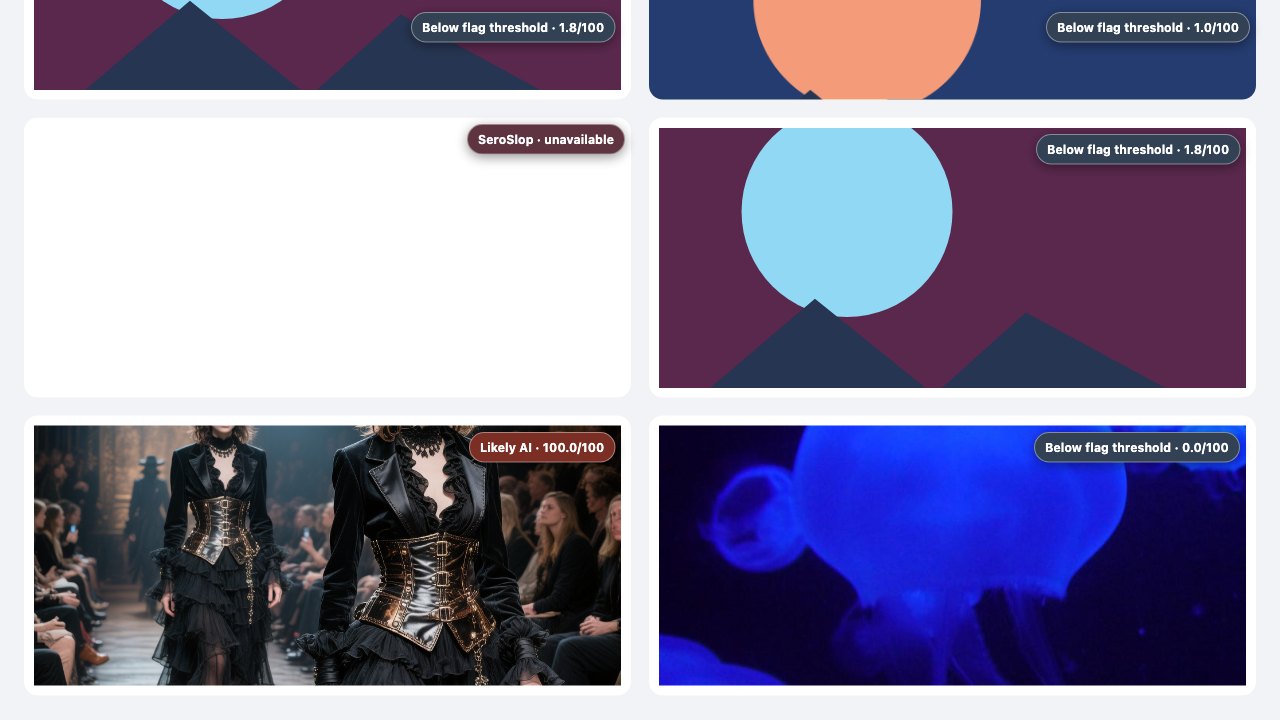
Browser-only scoring for signs of AI-generated images. The model runs entirely in the page. Nothing is uploaded to a server.
- Free
- Open source
- Chrome
Why I built it
AI-made images show up everywhere now, and most checkers want you to upload the picture to someone else's server. I wanted the check to happen on the page, next to the image I'm actually looking at. SeroSlop scores signs of AI generation in the browser. The model never leaves the page, and nothing is uploaded.
What makes it trustworthy
I tried to make every claim checkable. The model, its exact bytes and its SHA-256 are locked. The decision rule is fixed before testing. When an evaluation failed a gate, it stayed marked as failed in the record instead of being quietly rerun. On the public panel of 600 real and 600 synthetic images, run with the browser offline, it reached 85.83% balanced accuracy at the 65/100 threshold.
That is a model score on a public proxy, not a promise about every image you will meet. SeroSlop says so wherever it shows a result.
How it works
A content script finds images on the page. The extension's service worker bounds the work, and an offscreen document verifies the model bytes, prepares the image and runs it on WebGPU or WASM. Page-controlled URLs are never fetched, so the analysis never reaches out to the network.
A second opinion that stays on your computer
- Scores images inside the browser with one packaged ONNX model, on WebGPU with a WASM fallback.
- Choose one image, the main images on a page, or every visible image.
- A fixed, inclusive rule - a score of 65 or more out of 100 is flagged - and an honest "unavailable" when analysis fails.
- 85.83% balanced accuracy on a fixed 1,200-image public panel, run offline with no network requests.
- Reproducible releases with the model's SHA-256, evaluation receipts and a full benchmark record.
Limits. A score is not proof of origin. The model can be wrong, and it flags some ordinary photos.
Get SeroSlop
1. Download the latest seroslop-*.zip from GitHub Releases and unzip it.
2. Open chrome://extensions, turn on Developer mode, choose Load unpacked.
3. Select the unzipped folder and wait for "Offline ready".Full setup, configuration and troubleshooting are in the SeroSlop documentation.
Found a bug or want something added? Report a bug or request a feature on GitHub. No GitHub account? Email me.
SeroSlop questions
What is SeroSlop?
Browser-only scoring for signs of AI-generated images. The model runs entirely in the page. Nothing is uploaded to a server.
Is SeroSlop free?
Yes. SeroSlop costs nothing, and its source code is on GitHub under the MIT license.
How do I install SeroSlop?
Download the latest seroslop-*.zip from GitHub Releases and unzip it. Open chrome://extensions, turn on Developer mode, choose Load unpacked and select the folder. Wait for "Offline ready".
What does SeroSlop run on?
Desktop Chrome 121 or newer. It runs the model on WebGPU and falls back to WASM.
Does SeroSlop upload the images it checks?
No. Images are analyzed in the browser and never uploaded. SeroSlop has no detector API, telemetry or post-install model download.
How accurate is SeroSlop?
On a fixed public panel of 600 real and 600 synthetic images, run with the browser offline, it reached 85.83% balanced accuracy at its 65 out of 100 threshold. That is a model score on a public test set, not a promise about every image.
Does SeroSlop have limits?
A score is not proof of origin. The model can be wrong, and it flags some ordinary photos.
Documentation