Linux tool · Bash
omarchohard
Microsoft 365 on Omarchy, in one command.
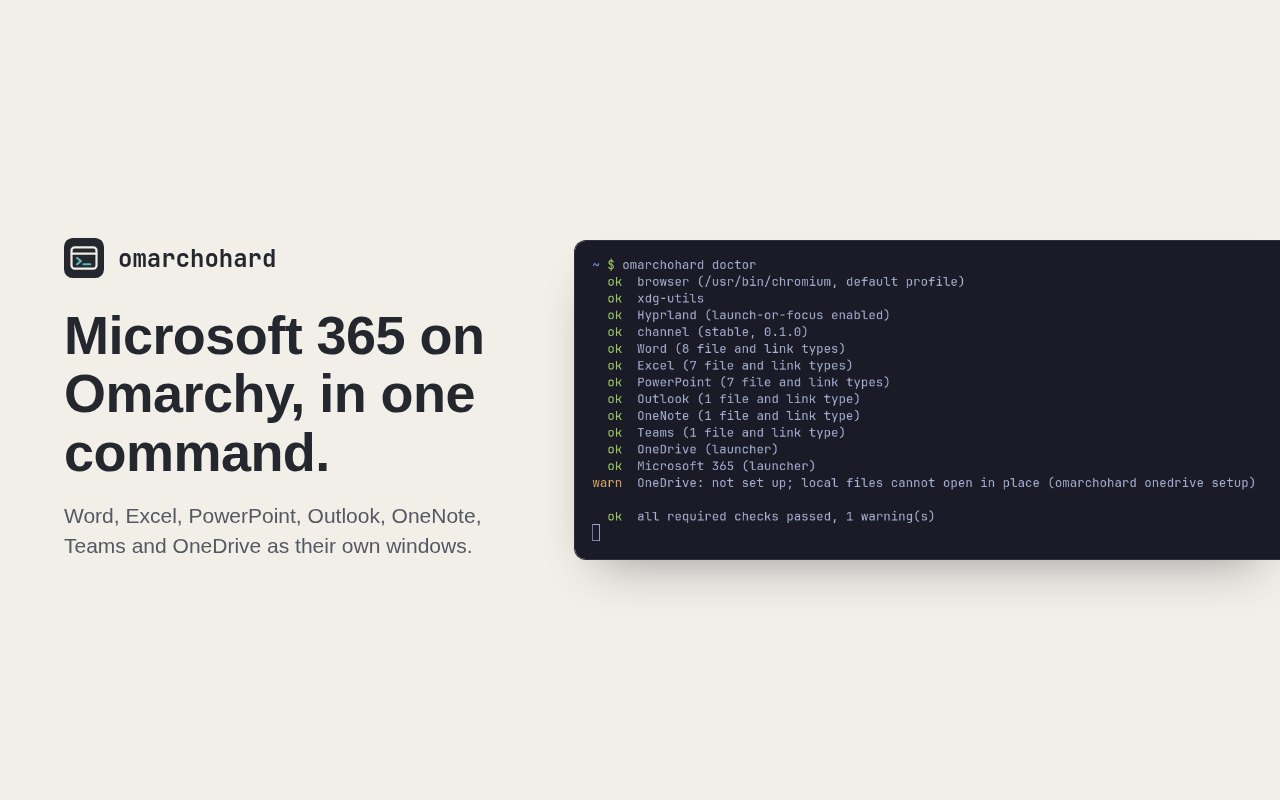
Puts Word, Excel, PowerPoint, Outlook, OneNote, Teams and OneDrive in the Omarchy launcher as their own windows, opens Office files from Files in the right app, and keeps OneDrive on disk.
- Free
- Open source
- Linux
Why I built it
I use Omarchy as a university student, yet Microsoft makes no desktop Office for Linux. So I built omarchohard: one command gives every Microsoft 365 app its own window in the launcher, opens Office files from Files in the right one, and keeps OneDrive on disk.
How it works
Each app is a Chromium app window pointed at Microsoft's own address, such as word.cloud.microsoft, with its own desktop entry, icon and window class. Hyprland sees it as a separate app, so it gets its own spot in the launcher and switcher, and launching one that is already open focuses it instead of opening another. The windows use the profile of the Chromium-based browser you already use, so a Microsoft sign-in there carries over.
Files
omarchohard registers as the handler for Office file types and for mailto, msteams, onenote and the ms-word, ms-excel and ms-powerpoint link schemes. Microsoft's web apps edit files that live in OneDrive, so a file inside your OneDrive folder opens at its OneDrive address and saves go back to it. A file from anywhere else is uploaded as a copy to OneDrive/Omarchohard first, and opens from there once the upload finishes. Your original is never touched. Uninstalling puts back whatever apps handled those types before.
Sync
omarchohard onedrive setup runs rclone's OneDrive sign-in in your default browser, then mounts OneDrive at ~/OneDrive as a systemd user service with a full local cache, a two second write-back and a thirty second poll for remote changes. The abraunegg OneDrive client is the other choice, for a complete offline copy.
Measured speed
On an Intel i9-14900HX with Chromium 152, an app window is on screen 0.4 seconds after a cold start, and 0.2 seconds when another Microsoft app is already open. The first launch ever, with a fresh profile, takes about 0.8 seconds.
Office apps that act like Omarchy apps
- One installer adds launchers, icons and window classes for Word, Excel, PowerPoint, Outlook, OneNote, Teams, OneDrive and the Microsoft 365 home page, then walks through a short guided setup.
- Pick which apps to install, Teams included, and add or remove one later.
- Office files, email links and Teams meeting links open in the right app from Files or xdg-open.
- A file in OneDrive opens in place; a file from anywhere else is uploaded as a copy to OneDrive first, so the original never changes.
- OneDrive on disk through rclone with a full local cache, or through the abraunegg client, signed in from your default browser, with a live upload queue and a sync command.
- [object Object]
- Office Add-ins and browser extensions work in the app windows.
- probe, setup --yes and optimize let a script or coding agent set it up and tune it for the machine.
- omarchohard doctor checks every launcher, handler and the OneDrive mount, and exits with an error when one is missing.
- Stable, nightly and dev channels, with omarchohard channel and omarchohard update.
- An optional Windows virtual machine through WinApps for desktop Office, with product key activation from a hidden prompt.
Limits. Microsoft makes no desktop Office for Linux, so the main apps are Microsoft's web apps and need an internet connection. The desktop tier needs about 16 GB of memory and an Office license, and has not run start to finish on real hardware yet.
Get omarchohard
curl -fsSL https://raw.githubusercontent.com/baney75/omarchohard/main/install.sh | bashFull setup, configuration and troubleshooting are in the omarchohard documentation.
Found a bug or want something added? Report a bug or request a feature on GitHub. No GitHub account? Email me.
omarchohard questions
What is omarchohard?
Puts Word, Excel, PowerPoint, Outlook, OneNote, Teams and OneDrive in the Omarchy launcher as their own windows, opens Office files from Files in the right app, and keeps OneDrive on disk.
Is omarchohard free?
Yes. omarchohard costs nothing, and its source code is on GitHub under the MIT license.
How do I install omarchohard?
Run the one-line installer in a terminal. It downloads the stable release, checks its sha256, links omarchohard into ~/.local/bin and starts a guided setup for your browser, apps, sign-in and OneDrive.
Does omarchohard run real desktop Office on Linux?
Not natively, because Microsoft doesn't make it. The main apps are Microsoft's web apps in their own windows. Desktop Office is available through an optional Windows virtual machine for people with the memory and a license.
Does omarchohard read my Microsoft password or tokens?
No. Sign-in happens on Microsoft's page in your own browser, and OneDrive sign-in goes through rclone or the OneDrive client. omarchohard never reads tokens, cookies or auth files.
Does omarchohard have limits?
Microsoft makes no desktop Office for Linux, so the main apps are Microsoft's web apps and need an internet connection. The desktop tier needs about 16 GB of memory and an Office license, and has not run start to finish on real hardware yet.
Documentation